

Telos Health: Designing for time-sensitive stroke procedures.


Physical UI
Digital UI
Project:
UX Design for a Robotic Stroke Surgery Platform
Key Contributions:
-
Developed storyboard for the team to visualize end-to-end product use especially key-frames for sterile and non-sterile environments.
-
Discover usable settings UI of the robotic platform.
-
Develop a cohesive visual design language.
-
Document findings for future iterations.
-
Enhance the assembly process through intuitive visual and haptic cues.
Role: UX Designer | UX Researcher
Duration: 4 Months
Selected Contributions
-
Develop storyboard for the team to visualize end-to-end product use especially key-frames for sterile and non-sterile environments.
-
Discover usable settings UI of the robotic platform.
-
Develop a cohesive visual design language.
Every second counts in stroke treatment - intervening within 20 minutes can mean full recovery.


Sketching Clarity: Mapping the Surgical Journey Through Storyboarding
To visualize and align the team on the end-to-end product lifecycle of the Robotic product.
Creating the storyboard was crucial for understanding the physical and procedural flow during stroke surgeries. As this was my first time observing procedures in real-time, I took detailed notes and sketched layouts capturing the spatial setup, tools, and the human-robot interactions.
By illustrating which parts of the room and equipment were sterile versus non-sterile, the storyboard helped the team clearly see where assembly steps could occur without violating sterility.
Result:
Visualization played a key role
-
Helped analyzing sterile and non-sterile environments
-
Aligned internal stakeholders which provided great clarity and led healthy discussions.
Note: Due to nature of NDA - Only few screens are shown.
Cracking the Code: Discover usable Settings UI of the robotic platform.
The settings UI had to be user-friendly under time-sensitive, high-pressure conditions.
Process:
1. Research and Discovery: Collaborated with fluidics engineers and clinical technicians to understand medical device settings. Discovered that current settings may not be relevant to the user flow of robotic procedure.
2. Ideation and Prototyping:
-
The brainstorming session resulted into 70+ ideas translated to 40+ wireframes narrowing down to 10 Concepts for prototype
-
Prototyped designs using Figma and ProtoPie for usability testing.
3. Testing and Iterations:
-
Conducted task-based usability testing with physicians alongside the UX manager.
-
Discovered that physicians preferred visual depictions over numeric data entry for settings UI.
-
Iterated UI based on feedback and usability insights.
-
Documented the entire usability testing process on Confluence for future reference.
Result:
-
Delivered an improved settings UI that was tested and validated with physicians and that aligned with the user flow of the product.
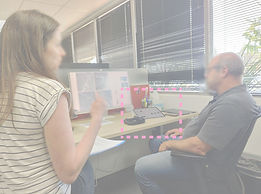

1. Research: Current manual settings


3. Shortlisting and Prototyping
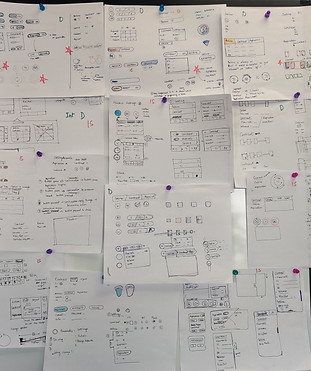
2. Generated 70+ ideas
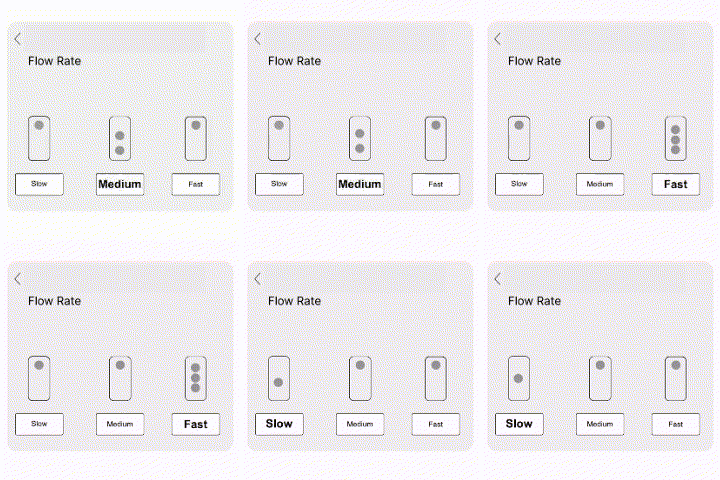
4. Usability Testing and Results - Remarks from physician, "This is what I was talking about; you read my mind." They added that it would be better if they could set it themselves.


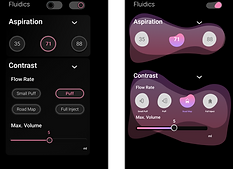

Created 20+ visual design options for the UI visual design.


Note: Due to nature of NDA - Only few screens are shown and blurred.
Designed and developed UI icons using illustrator and components for targeted applications.
Bringing the Interface to Life: Crafting Telos' Visual Design Language
Develop a cohesive visual design language.
To create a visual language that resonated with Telos branding - Futuristic, New Tech and accessible
Process
1. Research and Discovery:
-
Created 3 options of mood-board that resonated with the brand.
-
Observed that physicians work under dark environmental conditions and decided to go with Dark Theme.
-
Use of the color pink - Approachable and subtle for eyes yet a good differentiator.
2. Ideation and Prototyping:
-
Designed and created multiple UI prototypes and graphics for the brand.
Result: Enhanced usability of the robotic system’s settings UI that resonated with the Telos Brand.
Note: Due to nature of NDA - Only few screens are shown and blurred.

Learnings:
-
Observing real-time procedures provided critical insights into user needs and workflow challenges.
-
Physicians are more comfortable with visual depictions over numerical inputs in UI design.
-
Structured documentation is essential for continuity and future decision-making.
-
Cross-functional collaboration with engineers and clinical technicians was key to refining the UX.